

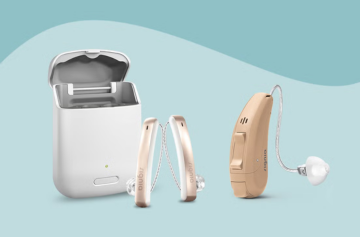
Ever wondered how to make the most of your hearing aid without the hassle? Well, the Signia BTE Fast P might just be your new best friend in the world of sound. Designed for clarity, comfort, and convenience, this device combines sleek technology with everyday practicality. But here’s the real question: how do you actually use it the right way? Don’t worry; we’re diving deep into that right now.
Understanding the Basics of Signia BTE Fast P
Before you pop it behind your ear, it’s worth knowing what makes the Signia BTE Fast P such a crowdfavourite. Think of it as the powerhouse of hearing AI, as it’s reliable, easy to use, and built for people who value crisp, natural sound without breaking the bank.
What’s Inside the Box?
When you open your package, you’ll typically find:
- The hearing aid itself
- Batteries or a rechargeable unit (depending on your model)
- A cleaning brush and wax guard
- Tubing and ear tips
- A user manual
It’s all the gear you need to start your hearing journey on the right note!
How to Use the Signia BTE Fast P Hearing Aid?
Now for the fun part, ar,t getting your hearing aid up and running. The process is surprisingly simple once you know what’s what.
Step 1: Inserting the Battery
First things first, insert the battery correctly. Flip open the battery door, match the positive (+) sign on the battery with the one inside the compartment, and close it gently. If your model’s rechargeable, just charge it overnight, and you’re good to go.
Step 2: Positioning Behind the Ear
Place the hearing aid over your ear so that it sits comfortably behind it. The thin tube or ear hook should fit snugly into your ear canal. Make sure it’s not too tight,t you’ll know it’s right when it feels light and balanced.
Step 3: Adjusting the Volume
Start at a lower volume to avoid sudden loud sounds. Gradually increase it until conversations sound natural. Some models have automatic volume adjustment, so you can let the device handle it for you.
Step 4: Pairing with Other Devices
If your version of the Signia BTE Fast P supports wireless connectivity, you can pair it with smartphones or TVs. Head to your device’s Bluetooth settings, find your hearing aid, and connect. That’s easy.
Step 5: Maintenance and Cleaning
Your hearing aid is like any other gadget; it needs regular TLC.
- Clean the ear mould and tubing daily.
- Avoid exposing it to moisture.
- Store it safely when not in use.
- Replace batteries as needed.
Tips for Getting the Best Experience
- Break it in gradually: Wear your hearing aid for short periods during the first few days.
- Avoid noisy environments initially: Let your ears adjust to normal conversations before tackling bustling areas.
- Schedule follow-ups: Regular check-ins with your audiologist can fine-tune your experience.
- Keep spares: Always have extra batteries or a backup device handy.
Common Mistakes to Avoid
Even the best hearing aids can perform poorly if not used correctly. Watch out for these rookie errors:
- Skipping daily cleaning can cause wax buildup can block sound.
- Ignoring feedback sounds this often means the fit isn’t right.
- Leaving it on while showering or swimming in water is a big no-no.
- Forgetting to turn it off when not in use it drains the battery faster.
Conclusion
Using the Signia BTE Fast P isn’t rocket science,; it’s more like learning to ride a bike. A little practice, a touch of care, and soon you’ll wonder how you ever lived without it. From its ergonomic design to its smart sound processing, this hearing aid makes every word, laugh, and melody crystal clear.
So, go ahead and follow the steps, care for your device, and embrace the joy of hearing life at its fullest. Because, honestly, great sound shouldn’t be complicated;, it should just be heard. 🎧