

Introduction
Kubernetes has become the leading platform for container orchestration in modern DevOps environments. Organizations use Kubernetes to automate deployment, scaling, and management of applications at large scale. Companies rely on Kubernetes to build strong CI/CD pipelines, support microservices, and accelerate digital transformation. However, with this rapid growth comes a major challenge: security. Kubernetes environments are highly dynamic. Containers are short-lived. Services communicate continuously. New pods appear and disappear every minute. This constant change makes security a critical priority.
Many learners exploring DevOps through devops engineer training, devops training online, and devops online training want to understand how to secure Kubernetes. Security skills open doors to real jobs and make engineers reliable professionals. Whether someone is pursuing devops courses, a devops engineer course, an AWS Devops course, or an azure devops course, Kubernetes security is now a key part of any practical engineering roadmap.
This blog provides a complete guide to Kubernetes security best practices. It uses real-world examples, statistics, practical explanations, hands-on guidance, and proven industry controls. The structure is clear and organized so that both new and advanced learners can benefit. We will cover security controls across networking, authentication, authorization, workloads, secrets, infrastructure, monitoring, and compliance. By the end, readers will understand how to design secure Kubernetes systems and apply them at work.
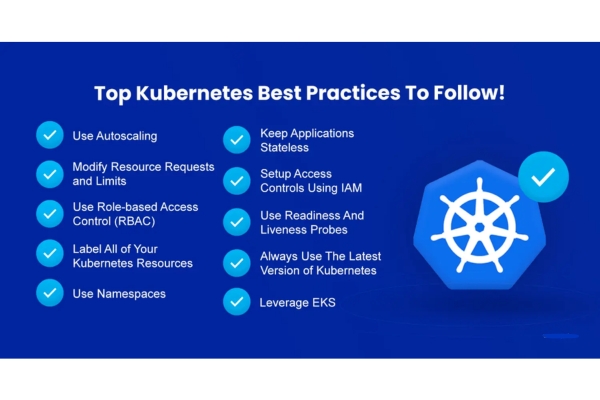
Why Kubernetes Security Matters
Kubernetes powers mission-critical systems in banking, healthcare, retail, energy, education, logistics, and manufacturing. According to a 2024 Red Hat report, 93% of companies experienced at least one Kubernetes-related security incident in the last year, leading to:
- System downtime
- Data exposure
- Business disruption
- Loss of trust
The same report showed that 53% of breaches happened because of misconfiguration, not software vulnerabilities. Simple mistakes lead to serious risk. Attackers often target:
- Kubernetes APIs
- Pod network traffic
- Default service accounts
- Insecure containers
- Weak RBAC permissions
- Exposed secrets
- Public dashboards
This makes security a shared responsibility across:
- Developers
- DevOps engineers
- Security engineers
- Cloud architects
- SRE teams
Security knowledge is now a standard requirement in DevOps jobs. For this reason, strong Kubernetes security is now included in most devops courses, aws devops course programs, azure devops course training, and devops engineer course learning paths at institutions like H2K Infosys.
Security Best Practices for Kubernetes
We will now explore the key areas where engineers should focus. Each section includes practical steps, real examples, and actionable learning.
1. Secure the Kubernetes API Server
The Kubernetes API server is the core control plane. Every administrative action passes through it. If attackers access the API, they can control the entire cluster. Therefore, API protection is the first priority.
Best Practices
✔ Enable Role-Based Access Control (RBAC)
RBAC defines what users and services can do. Never run clusters with unrestricted API access or admin-level permissions for everyone. A minimal policy example:
kind: Role
apiVersion: rbac.authorization.k8s.io/v1
metadata:
namespace: production
name: read-only-role
rules:
- apiGroups: [""]
resources: ["pods", "services"]
verbs: ["get", "list"]
Assign this role only to users who need read access.
✔ Enforce API Authentication
Use strong authentication methods like:
- Certificates
- OIDC (identity providers like Keycloak or Azure AD)
- Static tokens only for break-glass scenarios
✔ Restrict Anonymous Access
Disable all unauthenticated requests:
--anonymous-auth=false
✔ Use TLS for All Communication
Never allow unencrypted communication between API server and components.
2. Implement Network Security and Pod Isolation
Kubernetes networking is open by default. Pods can talk to each other freely unless policies restrict them. This can lead to lateral movement after a breach.
Use Network Policies
Network policies define allowed traffic. For example, this policy only allows inbound traffic to the backend service from the frontend:
kind: NetworkPolicy
apiVersion: networking.k8s.io/v1
metadata:
name: backend-policy
namespace: production
spec:
podSelector:
matchLabels:
app: backend
ingress:
- from:
- podSelector:
matchLabels:
app: frontend
This prevents unauthorized pod communication.
Zero Trust Networking
Adopt principles like:
- Deny all traffic by default
- Only allow required communication
- Continuously monitor network logs
Many companies adopt zero trust in production clusters because it limits blast radius during attacks.
3. Secure Container Images
Images are the building blocks of Kubernetes workloads. Malware or vulnerabilities inside images increase security risk.
Key Strategies
✔ Use Trusted Registries
Publish and pull images only from:
- Private container registries
- Signed repositories
- Verified sources
✔ Scan Images
Integrate scanners into CI/CD pipelines. Tools detect:
- CVEs
- Outdated packages
- Vulnerable dependencies
- Malware
✔ Keep Images Lightweight
Smaller images mean smaller attack surface. Use minimal base images like:
- Alpine
- Distroless
- Busybox
✔ Don’t Run as Root
Specify security context:
securityContext:
runAsUser: 1000
allowPrivilegeEscalation: false
4. Harden Worker Nodes
Nodes run container workloads. Securing them prevents attackers from gaining control.
Best Practices
- Patch OS regularly
- Use OS designed for containers (Flatcar, Bottlerocket, etc.)
- Disable unnecessary services
- Restrict SSH access
- Log all system activity
Enable Kubelet Authentication
Unauthorized kubelet access allows attackers to read or run workloads. Ensure:
--authentication-token-webhook=true
5. Protect Secrets and Sensitive Data
Kubernetes stores:
- Database passwords
- API keys
- Certificates
Never store these in plain text.
Use Kubernetes Secrets
Instead of embedding secrets in ConfigMaps or environment variables:
kubectl create secret generic db-password \
--from-literal=password=MyStrongPassword!
Enable Encryption at Rest
In the API server configuration:
--encryption-provider-config=/etc/kubernetes/encryption.yaml
Use External Secret Managers
Many organizations store secrets in:
- Vault
- AWS KMS
- Azure Key Vault
- Other encrypted vaults
External managers improve compliance and auditing.
6. Enforce Pod Security Standards
Pods must run in restricted conditions. Kubernetes provides Pod Security Standards (PSS) with three levels:
- Privileged
- Baseline
- Restricted
Production workloads should follow restricted mode.
Example Admission Control Policy
apiVersion: policy/v1beta1
kind: PodSecurityPolicy
metadata:
name: restricted
spec:
privileged: false
allowPrivilegeEscalation: false
runAsUser:
rule: MustRunAsNonRoot
7. Monitor Events, Logs, and Runtime Activity
Attack detection requires:
- Continuous visibility
- Log analysis
- Alerting
What to Monitor
- Kubernetes API logs
- Kubelet logs
- Container runtime events
- Network communication
- Pod life cycles
Common Tools
Companies use real-time inspection tools to detect:
- Reverse shells
- Unexpected network flows
- Changes to running containers
- Suspicious file access
Monitoring is a standard requirement taught in most Devops engineer training, devops training online, and devops online training programs.
8. Use Admission Controllers for Policy Enforcement
Admission controllers evaluate requests before execution. They stop unsafe configurations from entering the cluster.
Common Use Cases
- Block privileged containers
- Prevent images without signatures
- Enforce approved labels
- Require runtime policies
Example – Block Containers Running as Root
apiVersion: constraints.gatekeeper.sh/v1beta1
kind: K8sPSPNoPrivilege
metadata:
name: container-must-not-run-as-root
9. Ensure Supply Chain Security
Software supply chain risk is increasing. Attackers target:
- Build systems
- Image pipelines
- Package dependency trees
Key Controls
- Sign all container images
- Verify integrity before deployment
- Scan dependencies regularly
- Use SBOMs (Software Bill of Materials)
SBOMs help track exactly what is inside each image for auditing and compliance.
10. Enable Multi-Layer Access Control
Kubernetes requires layered protection through:
- API authentication
- RBAC authorization
- Pod Security Policies
- Network policies
- Node security
Never depend on one layer to stop attacks. If one fails, others limit the damage.
11. Automate Compliance and Governance
Large organizations must follow regulatory standards such as:
- PCI
- HIPAA
- GDPR
- ISO 27001
Automation helps ensure continuous compliance. Tools audit clusters and generate security reports.
Automated Governance Tasks
- Detect missing encryption
- Identify insecure RBAC roles
- Detect policy violations
- Highlight out-of-date images
Governance becomes essential at enterprise scale.
12. Enable Continuous Backup and Disaster Recovery
Security failures can still occur even with strong controls. Loss of:
- etcd data
- pod configurations
- persistent volumes
- cluster state
can lead to outages.
Best Practices
- Use etcd snapshots
- Backup application data
- Use offsite storage
- Test restore operations frequently
Many production outages become short and recoverable when backups exist.
13. Real-World Example of a Security Failure
In 2022, attackers compromised a Kubernetes cluster in a retail company because:
- Anonymous API access was enabled
- No RBAC restrictions existed
- Dashboard was exposed publicly
This allowed attackers to:
- Deploy cryptocurrency miners
- Exfiltrate API keys
- Slow down production systems
The company spent thousands in cloud charges due to the mining workload. The issue was resolved only after disabling public dashboards, enabling RBAC, and restricting network access.
Lessons:
- Small configuration mistakes can destroy environments
- Basic security controls stop most attacks
14. Hands-On Example: Creating a Secure Deployment Workflow
This section shows how a secure CI/CD process looks.
Step 1 – Developer Pushes Code
Git receives the commit.
Step 2 – CI Builds and Scans Image
Pipeline performs:
- Dependency scan
- Image vulnerability scan
- Malware scan
Step 3 – Sign the Image
Example with cosign:
cosign sign registry/myapp:v1
Step 4 – Policy Blocks Unsigned Deployments
Admission controller checks:
image must have valid signature
Step 5 – Deploy to Kubernetes
Deployment YAML uses:
securityContext:
runAsUser: 2000
readOnlyRootFilesystem: true
Step 6 – Network Policies Restrict Traffic
Only required communication allowed.
Step 7 – Runtime Monitoring Watches Behavior
If a container opens a reverse shell, alert triggers.
This workflow represents a secure Kubernetes deployment lifecycle.
15. Role of Structured Learning in Mastering Kubernetes Security
Many engineers learn Kubernetes security through real hands-on projects. Structured learning from platforms like H2K Infosys provides:
- Guided labs
- Real project simulations
- Practical CI/CD exercises
- Interview-focused preparation
Students in devops courses, aws devops course programs, azure devops course training, or a devops engineer course gain the confidence to manage security in production environments.
H2K Infosys also provides mentoring and structured guidance to help learners build job-ready portfolios and understand real-world scenarios.
Key Takeaways
- Kubernetes' environments move fast. This increases security risk.
- API protection, RBAC, network policies, and pod restrictions are essential.
- Always scan and sign container images before deployment.
- Secrets must be encrypted and never stored in plain text.
- Runtime monitoring, logging, and auditing detect attacks early.
- Compliance automation ensures long-term governance.
- Hands-on DevOps training builds real engineering confidence.
Conclusion
Kubernetes demands strong security at every layer. Start applying these controls today and build a safe production-ready environment.
Enroll in advanced DevOps training to upgrade your Kubernetes security skills and grow faster in your engineering career.