

Behind every stable network is an engineer who knows how to solve problems under pressure, and that’s exactly what interviewers want to see. From networking fundamentals to advanced troubleshooting, technical interviews are designed to assess both knowledge and ability to think logically. Preparing the right Networking Interview Questions and Answers in 2026 can help you build confidence, sharpen your technical skills, and stand out in a competitive hiring process.
Success in a networking interview isn’t about memorising definitions and it’s about understanding how technologies work in real-world environments and applying them effectively. This blog brings together 50+ Networking Interview Questions and Answers, covering networking concepts, routing, switching, protocols, security, and scenario-based problems to help you prepare with confidence and perform at your best in 2026.
This guide is created with insights from industry experts and CCIE-certified trainers at PyNet Labs to help you understand networking concepts in a simple and practical way.
What is Networking?
Networking is the process of connecting computers, servers, and other devices to exchange data, share resources, and communicate efficiently. It forms the backbone of modern digital communication, enabling services such as internet access, cloud computing, email, and file sharing. A strong understanding of networking is essential for IT professionals, as it supports the design, management, and troubleshooting of secure and reliable networks.
Networking Interview Questions and Answers for Freshers
Here are the top most asked Basic networking interview questions for freshers:
Q1. What is a Computer Network?
Answer: A computer network is a group of interconnected devices that communicate with each other to share data, resources, and services. Networks use standard communication protocols such as TCP/IP to enable secure and efficient data exchange.
Interviewer Tip: Mention that networks can be wired or wireless depending on the communication medium.
Q2. What are the different types of networks?
Answer: Networks are classified based on their geographical coverage and purpose. Mainly there are four types of networks. These are:
- LAN (Local Area Network): Connects devices within a small area such as an office or home.
- WAN (Wide Area Network): Connects multiple LANs over large geographical distances.
- MAN (Metropolitan Area Network): Covers a city or metropolitan region.
- PAN (Personal Area Network): Connects personal devices such as smartphones, laptops, and wearables.
Q3. What is the OSI Model?
Answer: The Open Systems Interconnection (OSI) Model is a seven-layer reference model that explains how data is transmitted between devices over a network. Each layer performs a specific function, making network communication easier to understand and troubleshoot.
The seven OSI layers are:
- Physical
- Data Link
- Network
- Transport
- Session
- Presentation
- Application
Interviewer Tip: Be prepared to explain the function of each layer, especially Layers 2, 3, and 4.
Q4. What is the TCP/IP Model?
Answer: The TCP/IP model is the practical networking model used on the Internet. It consists of four layers that define how devices communicate and exchange data across interconnected networks.
The four TCP/IP layers are:
- Network Access
- Internet
- Transport
- Application
Q5. What is the difference between OSI and TCP/IP?
Answer: The following table highlights the key differences between the OSI and TCP/IP models:
OSI Model
TCP/IP Model
Consists of 7 layers.
Consists of 4 layers.
Reference model for understanding networking.
Practical model used on the Internet.
Separates Presentation and Session layers.
Combines these functions into the Application layer.
Mainly used for learning and troubleshooting.
Used in real-world network communication.
Q6. What is an IP Address?
Answer: An IP (Internet Protocol) address is a unique logical address assigned to a device on a network. It enables devices to identify and communicate with each other across local and public networks.
Example: 192.168.1.10
Q7. What is the difference between IPv4 and IPv6?
Answer: Below are some of the key differences between IPv4 and IPv6:
IPv4
IPv6
Uses 32-bit addresses.
Uses 128-bit addresses.
Supports approximately 4.3 billion addresses.
Supports a virtually unlimited number of addresses.
Written in decimal format.
Written in hexadecimal format.
Requires NAT in many deployments.
Designed to eliminate IPv4 address exhaustion.
Interviewer Tip: Mention that IPv6 provides a much larger address space and improved routing efficiency.
Q8. What is a MAC Address?
Answer: A Media Access Control (MAC) address is a unique physical address assigned to a Network Interface Card (NIC). It operates at the Data Link layer and enables communication between devices on the same local network.
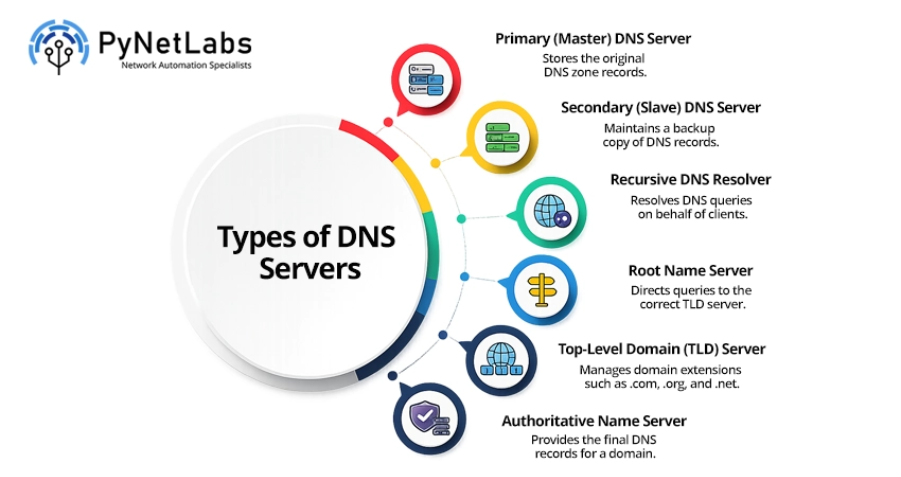
Q9. What is DNS?
Answer: DNS (Domain Name System) translates human-readable domain names into IP addresses. This allows users to access websites without remembering numerical IP addresses.
Example: www.google.com → 142.x.x.x
Q10. What is DHCP?
Answer: Dynamic Host Configuration Protocol (DHCP) automatically assigns IP addresses, subnet masks, default gateways, and DNS server information to devices on a network. This reduces manual configuration and simplifies network management.
Q11. What is NAT?
Answer: Network Address Translation (NAT) converts private IP addresses into public IP addresses, allowing multiple devices to access the Internet using a single public IP. It also improves IPv4 address utilisation and provides an additional layer of security.
Q12. What is a Default Gateway?
Answer: A default gateway is the router that forwards traffic from a local network to external networks. It acts as the exit point for devices communicating outside their own subnet.
Q13. What is a Subnet Mask?
Answer: A subnet mask identifies the network and host portions of an IP address. It helps devices determine whether the destination is on the same network or a different network.
Example: 255.255.255.0
Q14. What is Subnetting?
Answer: Subnetting is the process of dividing a large network into smaller logical subnetworks. It improves network performance, enhances security, and ensures efficient use of available IP addresses.
Interviewer Tip: Practice subnetting calculations, as they are commonly asked during networking and CCNA interviews.
Q15. What is the difference between TCP and UDP?
Answer: The following are the key differences between TCP and UDP:
TCP (Transmission Control Protocol)
UDP (User Datagram Protocol)
Connection-oriented protocol.
Connectionless protocol.
Reliable and ensures data delivery.
Faster but does not guarantee delivery.
Performs error checking and retransmission.
Minimal error checking with no retransmission.
Used for web browsing, email, and file transfers.
Used for video streaming, VoIP, and online gaming.
Interviewer Tip: A common interview question is “When would you choose TCP over UDP?” Explain that TCP is preferred when reliability is critical, while UDP is ideal for applications requiring low latency and high speed.
Networking Interview Questions and Answers: Intermediate Level
As you progress in a networking interview, interviewers often focus on routing, switching, network protocols, and traffic management. The following questions assess your understanding of real-world networking concepts and your ability to troubleshoot enterprise networks.
Q16. What is Routing?
Answer: Routing is the process of forwarding data packets between different networks using routers. Routers use routing tables and routing protocols to determine the most efficient path for packet delivery.
Q17. What is Switching?
Answer: Switching is the process of forwarding data frames between devices within the same Local Area Network (LAN). Switches use MAC addresses to ensure data reaches the intended destination efficiently.
Q18. What is the difference between a Hub, Switch, Bridge, and Router?
Device
Function
Hub
Broadcasts data to all connected devices without filtering.
Bridge
Connects two LAN segments and filters traffic using MAC addresses.
Switch
Forwards data only to the destination device using MAC addresses.
Router
Connects different networks and forwards packets using IP addresses.
Interviewer Tip: Interviewers often ask which OSI layer each device operates on. Remember that hubs work at Layer 1, bridges and switches at Layer 2, and routers at Layer 3.
Q19. What is a VLAN?
Answer: A VLAN (Virtual Local Area Network) logically divides a physical switch into multiple separate broadcast domains. It improves network security, reduces broadcast traffic, and simplifies network management.
Q20. What is the difference between an Access Port and a Trunk Port?
Answer: The following table highlights the key differences between an Access Port and a Trunk Port used in VLAN-based networks:
Access Port
Trunk Port
Carries traffic for a single VLAN.
Carries traffic for multiple VLANs.
Connects end devices such as PCs and printers.
Connects switches, routers, or other network devices.
Frames are transmitted without VLAN tags.
Uses IEEE 802.1Q VLAN tagging.
Q21. What is Spanning Tree Protocol (STP)?
Answer: Spanning Tree Protocol (STP) is a Layer 2 protocol that prevents switching loops by blocking redundant paths. It ensures a loop-free network while keeping backup links available for failover.
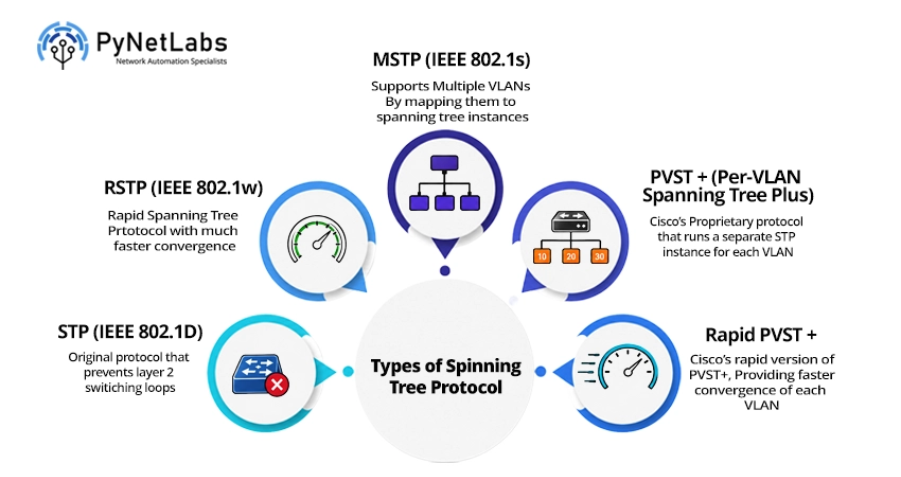
Interviewer Tip: Learn the concepts of the Root Bridge, Root Port, and Designated Port, as these are commonly discussed during interviews.
Q22. What is EtherChannel?
Answer: EtherChannel combines multiple physical links into a single logical connection to increase bandwidth and provide redundancy. It also improves load balancing and prevents individual link failures from disrupting connectivity.
Common EtherChannel Protocols:
- LACP (IEEE 802.3ad)
- PAgP (Cisco Proprietary)
Q23. What is OSPF?
Answer: Open Shortest Path First (OSPF) is a link-state dynamic routing protocol that uses the Shortest Path First (SPF) algorithm to determine the best path. It is widely used in enterprise networks because of its fast convergence and scalability.
Q24. What is RIP?
Answer: RIP (Routing Information Protocol) is a distance-vector routing protocol that uses hop count as its routing metric. It supports a maximum of 15 hops, making it suitable only for small networks.
Q25. What is BGP?
Answer: Border Gateway Protocol (BGP) is a path-vector routing protocol used to exchange routing information between different Autonomous Systems (AS). It is the primary routing protocol used on the Internet due to its scalability and policy-based routing capabilities.
Q26. What is Administrative Distance?
Answer: Administrative Distance (AD) is the value a router uses to determine the most trustworthy route when multiple routing sources are available. A lower AD indicates a more preferred route.
Q27. What is a Routing Table?
Answer: A routing table stores information about network destinations and the best paths to reach them. Routers use this information to forward packets efficiently across networks.
Useful Command: show ip route
Q28. What is ARP?
Answer: Address Resolution Protocol (ARP) maps an IPv4 address to its corresponding MAC address on a local network. It enables devices to identify the correct destination hardware address before transmitting data.
Useful Command: show arp
Q29. What is ICMP?
Answer: Internet Control Message Protocol (ICMP) is used to send error messages and network diagnostic information between devices. It is commonly used by tools such as ping and traceroute to verify connectivity and troubleshoot network issues.
Q30. What is TTL (Time To Live)?
Answer: TTL (Time To Live) is a field in the IP header that limits how many routers a packet can pass through before being discarded. It prevents packets from circulating indefinitely due to routing loops.
Interviewer Tip: During troubleshooting, a TTL expired message often indicates a routing loop or an incorrect routing configuration.
Networking Interview Questions and Answers: Advanced Level
The following advanced networking interview questions cover network security, enterprise services, and modern networking concepts. These topics are commonly discussed to evaluate your practical knowledge and ability to manage secure, scalable, and high-performance networks.
Q31. What is an Access Control List (ACL)?
Answer: An Access Control List (ACL) is a set of rules that permit or deny network traffic based on IP addresses, protocols, or port numbers. ACLs help improve network security by controlling inbound and outbound traffic.
Interviewer Tip: ACLs are commonly used to filter traffic, restrict user access, and enhance network security.
Q32. What is the difference between Standard and Extended ACLs?
Answer: Below are the key differences between Standard and Extended ACLs:
Standard ACL
Extended ACL
Filters traffic using only the source IP address.
Filters traffic using source and destination IP addresses, protocols, and port numbers.
Simpler configuration.
Provides more granular traffic control.
Usually placed close to the destination.
Usually placed close to the source.
Q33. What is Port Security?
Answer: Port Security is a Layer 2 switch security feature that restricts which devices can connect to a switch port based on their MAC addresses. It helps prevent unauthorised devices from accessing the network.
Q34. What is SSH, and why is it preferred over Telnet?
Answer: SSH (Secure Shell) provides encrypted remote access to network devices, ensuring that login credentials and data remain secure during transmission. It is preferred over Telnet because Telnet sends information in plain text.
Q35. What is PAT (Port Address Translation)?
Answer: Port Address Translation (PAT), also known as NAT Overload, allows multiple devices to share a single public IP address by using different port numbers. It is the most commonly deployed form of NAT in enterprise and home networks.
Interviewer Tip: Remember that PAT is a many-to-one translation technique that helps conserve public IPv4 addresses.
Q36. What is Quality of Service (QoS)?
Answer: Quality of Service (QoS) is a network feature that prioritises important traffic such as voice, video, and business-critical applications. It helps reduce latency, jitter, and packet loss during network congestion.
Q37. What is a VPN?
Answer: A Virtual Private Network (VPN) creates an encrypted tunnel between a user and a private network over the Internet. It enables secure remote access while protecting sensitive data from unauthorised access.
Q38. What is a Proxy Server?
Answer: A proxy server acts as an intermediary between a client and the Internet by forwarding requests on behalf of the user. It helps improve security, privacy, content filtering, and network performance.
Q39. What is Load Balancing?
Answer: Load balancing distributes incoming network traffic across multiple servers or network devices to prevent overload. It improves application availability, performance, and fault tolerance.
Q40. What is Cisco Discovery Protocol (CDP)?
Answer: Cisco Discovery Protocol (CDP) is a Cisco proprietary Layer 2 protocol used to discover directly connected Cisco devices. It provides information such as device name, IP address, platform, and interface details.
Useful Command: show cdp neighbors
Q41. What is Link Layer Discovery Protocol (LLDP)?
Answer: Link Layer Discovery Protocol (LLDP) is an open-standard Layer 2 protocol that enables devices from different vendors to exchange information about their capabilities and neighbouring devices.
Useful Command: show lldp neighbors
Q42. What is the difference between CDP and LLDP?
Answer: The key differences between Cisco Discovery Protocol (CDP) and Link Layer Discovery Protocol (LLDP) are outlined below:
CDP
LLDP
Cisco proprietary protocol.
Open IEEE 802.1AB standard.
Works only with Cisco devices.
Supports devices from multiple vendors.
Best suited for Cisco-only environments.
Ideal for mixed-vendor networks.
Q43. What is Software-Defined Networking (SDN)?
Answer: Software-defined Networking (SDN) is a networking architecture that separates the control plane from the data plane. This enables administrators to centrally manage and automate network configuration through software.
Interviewer Tip: Mention that SDN improves network flexibility, automation, and scalability in modern enterprise environments.
Q44. What is Network Automation?
Answer: Network Automation is the process of using software and scripts to configure, manage, and monitor network devices automatically. It reduces manual effort, minimises configuration errors, and improves operational efficiency.
Gain practical automation skills that employer’s value with Network Automation Course with Python, Ansible & APIs – Sign up now to know more!
Q45. What are REST APIs in Networking?
Answer: REST APIs (Representational State Transfer Application Programming Interfaces) enable applications to communicate with network devices using HTTP methods such as GET, POST, PUT, and DELETE. They are widely used for network automation, monitoring, and configuration management.
Interviewer Tip: Modern network platforms such as Cisco DNA Center, Cisco Meraki, and Cisco SD-WAN extensively use REST APIs for automation and integration.
Networking Interview Questions and Answers: Scenario-based
The following scenario-based networking interview questions test your ability to analyse, troubleshoot, and resolve real-world network issues. Interviewers often use these questions to evaluate your practical approach rather than just your theoretical knowledge.
Q46. A user cannot access the internet. How would you troubleshoot the issue?
Answer: Start by checking the physical connection, IP address, subnet mask, default gateway, and DNS configuration on the user’s device. Then verify router connectivity, NAT configuration, routing tables, and ISP connectivity to identify where the communication is failing.
Interviewer Tip: Explain your troubleshooting process step by step instead of jumping directly to the solution.
Q47. A client is not receiving an IP address from the DHCP server. What would you check?
Answer: Verify that the DHCP server is running and the DHCP scope has available IP addresses. Then check the client’s VLAN, interface status, DHCP relay configuration (ip helper-address), and ensure no ACLs are blocking DHCP traffic.
Take the next step towards automation excellence with CCNP Automation Course || AUTOCOR v2.0 Training Online – Register today!
Q48. OSPF neighbours are not forming an adjacency. What could be the possible reasons?
Answer: Check whether both routers have matching Area IDs, Hello and Dead timers, subnet masks, authentication settings, and OSPF network types. Also ensure the interfaces are enabled and OSPF is configured on the correct interfaces.
Interviewer Tip: Mismatched Area IDs and authentication settings are among the most common causes of OSPF adjacency failures.
Q49. Devices in different VLANs cannot communicate. How would you troubleshoot the issue?
Answer: Verify that the devices are assigned to the correct VLANs and confirm that inter-VLAN routing is configured on the Layer 3 switch or router. Also check trunk ports, allowed VLANs, SVIs, and ACLs that might be blocking traffic.
Q50. High network latency is affecting application performance. How would you identify the cause?
Answer: Use monitoring tools to identify bandwidth utilisation, interface errors, and packet loss across the network. Check for congestion, overloaded links, routing issues, or QoS misconfigurations that may be increasing latency.
Q51. Users report intermittent packet loss. What troubleshooting steps would you follow?
Answer: Begin by testing connectivity using ping and traceroute, then examine switch ports, interface statistics, cable health, and network utilisation. Also check for duplex mismatches, faulty hardware, or routing instability that could cause packet loss.
Interviewer Tip: Mention commands such as show interfaces, show ip interface brief, and show logging to demonstrate practical troubleshooting skills.
Q52. Which networking commands do you use most frequently during troubleshooting?
Answer: Some of the most commonly used networking commands include:
- Ping: Tests network connectivity.
- Traceroute: Identifies the path packets take to reach the destination.
- show ip interface brief: Displays interface status and IP addresses.
- show ip route: Shows the routing table.
- show running-config: Displays the active device configuration.
- show arp: Displays the ARP table.
- show mac address-table: Shows learned MAC addresses on a switch.
- show cdp neighbors / show lldp neighbors: Displays directly connected network devices.
Interviewer Tip: Along with naming the commands, briefly explain when you would use each one. Interviewers often value your troubleshooting methodology more than memorising commands.
Conclusion
In this blog, we have covered some of the basic, advanced and scenerio based networking interview questions and answers for freshers and experienced candidates as well. Whether you are applying for a network engineer or any other role, these questions will help you demonstrate your knowledge and skills in computer networks. We hope that this blog has given you some insights into the networking interview questions that you can expect in your interviews.
Remember to prepare well, practice your answers, and be confident. Good luck with your networking career!